Getting Started
Required Installations:
Install dependencies
Terminal virtual environment
Environment Setup
-
Create Configs and Schemas: Each service and source has it own config and schema you will need to create before run a service.
-
Create a directory for the target source under the
.configs/then create all the configs and schemas.
Config Example: - File Downloader
{
  "name": "ceaf-config",
  "active": true,
  "frequency": "daily",
  "service": "file-downloader",
  "source": "ceaf",
  "context": "br",
  "depends_on": [{
    "service": "source-watcher",
    "source": "ceaf"
  }],
  "service_parameters": {
    "job_handler": "default"
  },
  "job_parameters": {
    "url": "https://portaldatransparencia.gov.br/download-de-dados/ceaf/{}"
  }
}
Schema Example - File Downloader (Schema Type: Input)
{
    "schema_type": "service-input",
    "service": "file-downloader",
    "source": "ceaf",
    "context": "br",
    "json_schema": {
        "type": "object",
        "properties": {
            "documentUri": {
                "type": "string"
            },
            "partition": {
                "type": "string"
            }
        },
        "required": [
            "documentUri",
            "partition"
        ]
    }
}
You can check all configs and schemas example for one source here
-
Make sure all the
.env.<ENVIRONMEMNT>files for all the service are created. (each project has it own example) -
Create Buckets and Post the configs and schemas to each API:
- Some buckets are needed for each responsibility, service and also source
- The configs created in the directory under the
.configs/needed to be saved in the mongoDB the you need to post the configs and the schemas in each API.
To Create and to make the Post Request run the commmand:
Thats it... The source has been added to the environment then all the services can start:
- if get an error in the compose, run: This comand will try to make the compose up again.Diagram
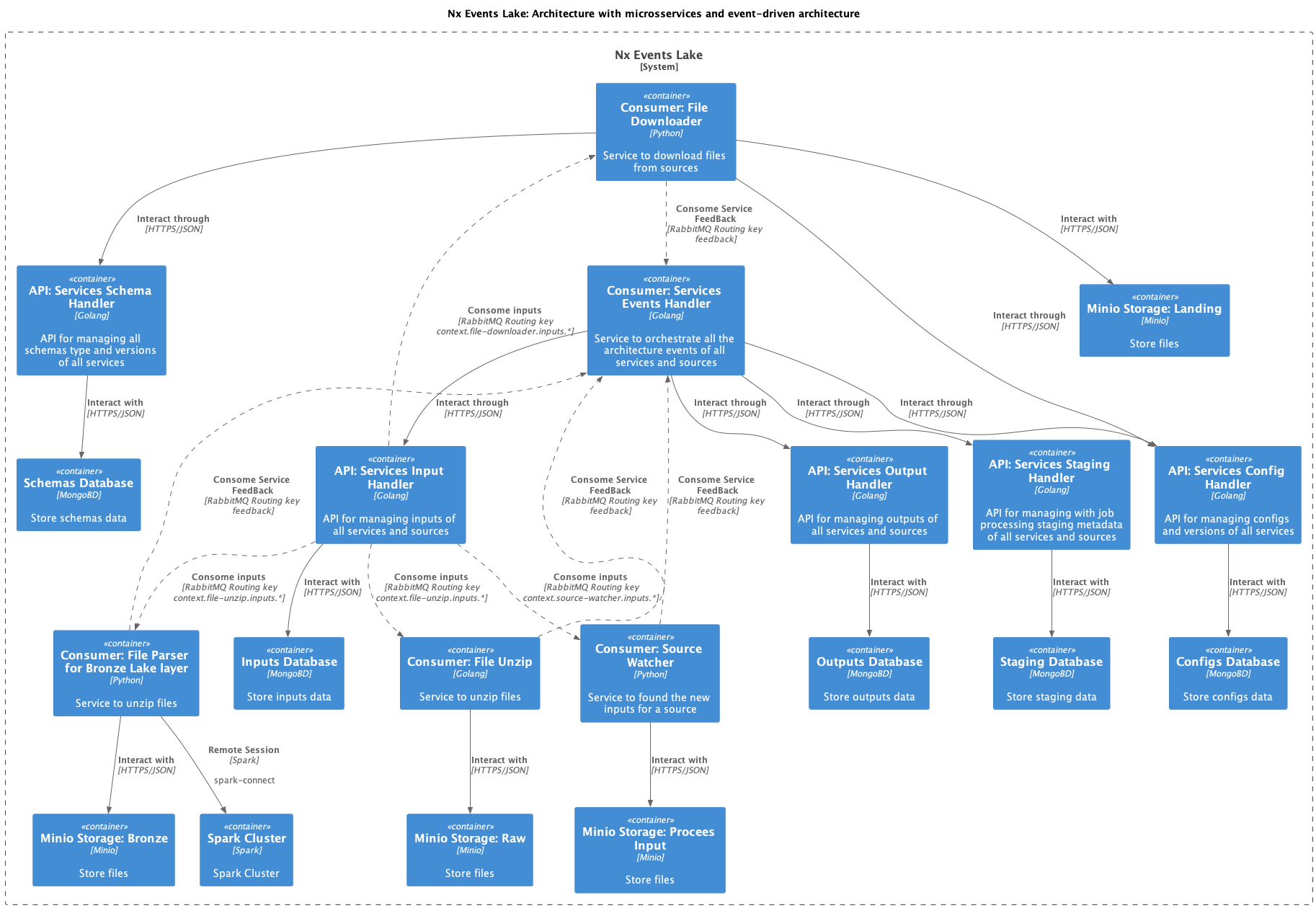
This repo was structured with a monorepo approach and optimize with NX framework.
Feel free to take a look in the nx cloud ui of the workspace