Document Vectorizer
document-vectorizer is a Python-based service that performs the following tasks:
- process document data, extracting relevant information
- creating vector embeddings for further analysis.
Overview
The Document Vectorizer is built to handle document data processing within a distributed architecture. It utilizes asyncio, RabbitMQ, Minio, and Neo4j to efficiently process and store vector embeddings.
Service Components
The service consists of multiple Python modules and classes, each serving a specific purpose. Here's an overview of these components:
Main Module
main.py: The entry point of the service.- It initializes various configurations, including the service name and context environment.
- Load LLM Model.
- Creates consumers for specific configurations and starts processing data.
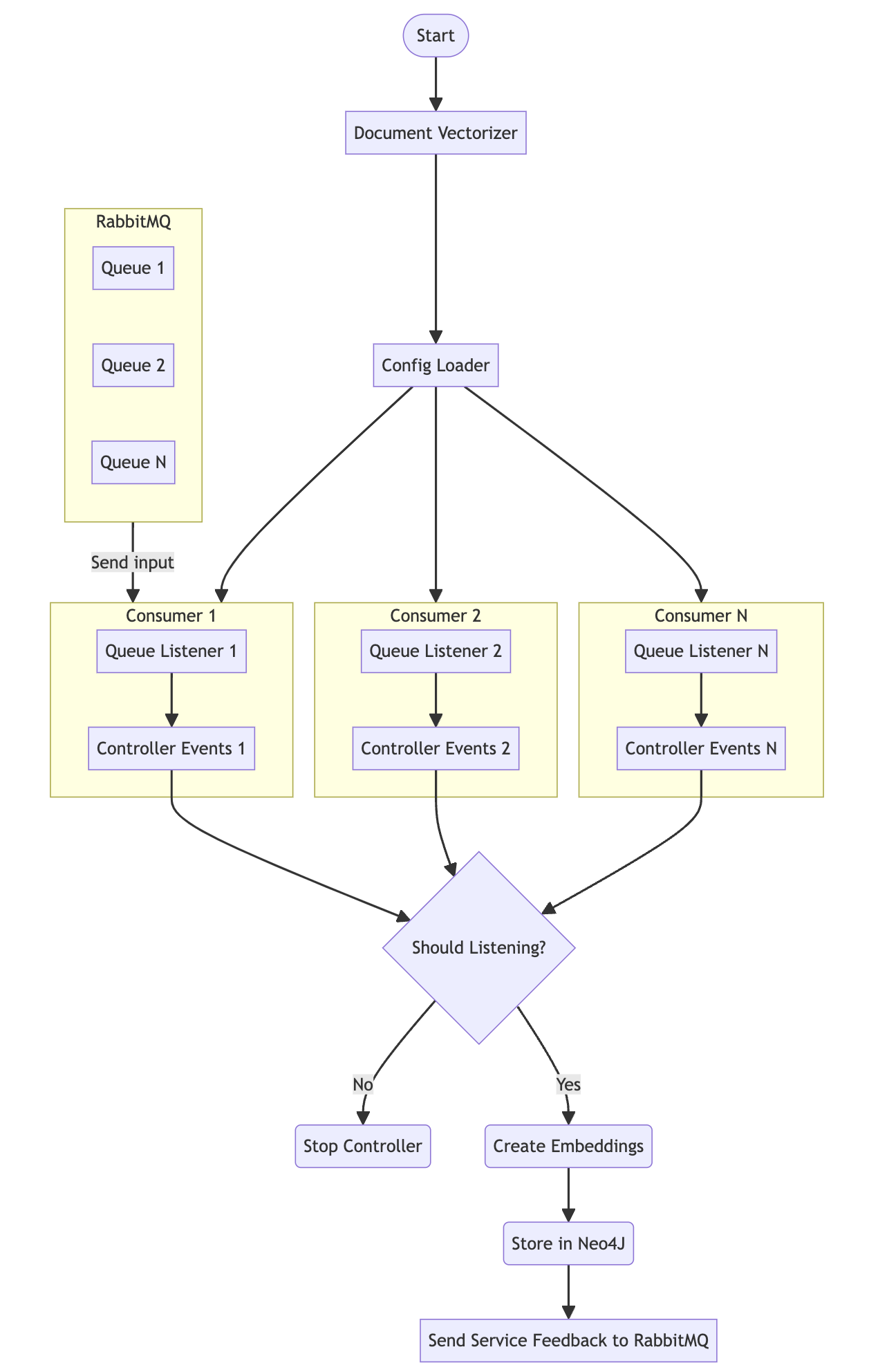
- Each config has it owns queue consumption.
Consumer Module
The Event Consumer is responsible for creating consumers for processing data from various configurations. It connects to RabbitMQ and triggers the Event Controller.
file_downloader/consumer/consumer.py: Contains theEventConsumerclass responsible for consume an input message and trigger the callback.- This class listens to a RabbitMQ queue, processes incoming data, and trigger the results to the controller.
Controller Module
The Event Controller processes incoming event data, converts it into the appropriate format, and dispatches jobs for further processing. It interacts with the Job Handler to process the document data.
-
file_downloader/controller/controller.py: This module contains theEventControllerclass, which is responsible for handling the business logic related to event processing. -
The
EventControllerclass receives the processed data from theEventConsumer. - It checks if the controller should be active based on the configuration.
- If active, it parses and processes the data using the job handler.
- It triggers the job dispatcher to execute the job and collect the results.
- It publishes the results, including the storage URI, to a message queue for further consumption.
The EventController class plays a crucial role in orchestrating the event-driven processing of data within the service.
This class ensures that the service processes incoming data efficiently, initiates the appropriate job handler for the task, and communicates the results to the relevant channels.
Job Handling Module
The Job Handler executes jobs associated with a configuration. It imports the appropriate job handler module based on the specified name, processes the document data, and stores vector embeddings.
file_downloader/jobs/job_handler.py: Handles the execution of jobs related to downloading and storing the file in a bucket.- It uses a specific job handler module based on the configuration.
Job Handler Module
Default Handler
jobs/handlers/pdf_embeddings/job.py: An example job handler module.- It defines the logic for creating vector embeddings for PDF files.
- It stores the embeddings vectors in Neo4J.
- It returns the job result, including the storage URI and status.
Libraries Dependencies:
Configuration Module
config_loader: Loads configurations for the service, such as the source, job handler, service parameters and job parameters also.
RabbitMQ Module
pyrabbitmq: Handles the interaction with RabbitMQ, including creating channels, queues, and publishing messages.
Service Discovery Module
pysd: Manages service discovery and RabbitMQ endpoints.
Architecture Diagram
C4 Diagram
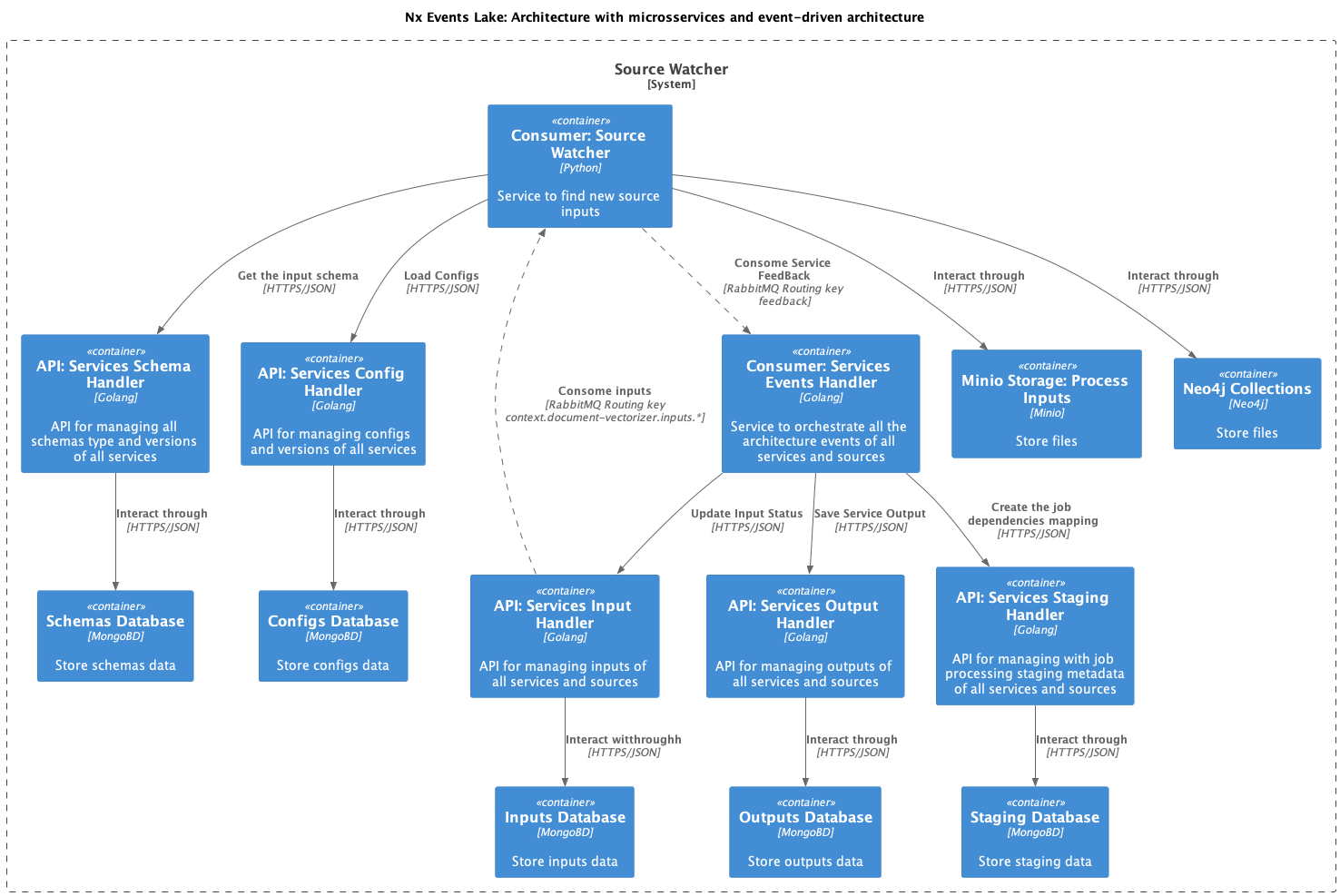
Service Diagram
How to Run the Service
To run your service, follow these steps:
-
Setup Configuration:
- Create a
.env.{ENVIRONMENT}file based on the example provided in theenvsfolder.
- Create a
-
Build The Service:
- Run the Application:
Please note that this README provides a high-level overview of your service's structure and components. To run the service effectively, make sure to provide the required configurations and customize the job handler logic according to your specific use case.
If you have any questions or need further assistance, feel free to ask.